


Most ad teams do not lose time because they are lazy.
They lose time because the workflow is messy.
You open Google Ads. Then Meta Ads. Then maybe GA4. Then a spreadsheet. Then another spreadsheet. Then someone asks a simple question like, “What changed last week?” and suddenly you are doing manual analysis instead of actual marketing.
Jump to:
That is why more marketers are looking at Claude as a working layer on top of ad data. Anthropic now supports custom connectors through remote MCP, which means Claude can connect to external tools and data sources instead of relying only on pasted screenshots or exported CSV files. The guide you shared also shows a practical setup path where Google Ads, Meta Ads, and GA4 can be brought into one workflow through a custom connector.
The real appeal is not “AI for the sake of AI.”
It is speed, context, and better questions.
Instead of building reports from scratch every time, you can ask Claude to compare weeks, flag wasted spend, find budget pacing issues, or identify campaigns that look healthy on the surface but are quietly burning money underneath. Third-party ad connector guides position this as a way to audit, report on, and review Google Ads and Meta Ads in one conversation rather than bouncing across platforms.
This matters most for lean teams, agencies, and in-house marketers who already know what good performance looks like but are tired of spending half their day just pulling the numbers.
Why are marketers trying to connect ad accounts to Claude in the first place?
The problem is not access to data.
The problem is how long it takes to turn data into answers.
Most ad accounts already have enough information to spot wasted spend, weak creatives, audience overlap, or pacing issues. But getting to those answers often means exporting reports, cleaning columns, comparing date ranges, and explaining the same performance story over and over again. The LinkedIn walkthrough you shared describes this exact pain: too much time spent exporting, pivoting, and rebuilding views just to answer simple performance questions.
Claude becomes useful when it sits on top of that workflow and shortens the path between question and action.
Instead of asking, “Where is the report?” you ask, “Which campaigns spent more than expected this week?” Instead of saying, “Give me an hour,” you ask for a trend summary in plain English.
Here is a simple way to think about it:
| Task | Old workflow | Cross-platform comparison | Why it matters |
|---|---|---|---|
| Weekly review | Ask for a week-over-week summary | Claude connected the workflow | Faster decisions |
| Wasted spend check | Filter reports by cost and conversions | Ask Claude to flag spend with no results | Easier triage |
| Cross platform comparison | Compare Google Ads and Meta Ads separately | Review both in one conversation | Better context |
| Budget pacing | Build sheet formulas | Start with an AI summary, then refine | Faster monitoring |
| Client reporting | Pull screenshots and explain manually | Ask for over- and under-pacing accounts | Saves time |
This does not magically make strategy better.
It gives the strategy a better operating system.
What do you need before you connect Google Ads and Meta Ads to Claude?
You do not need to turn into a developer for this.
But you do need the right setup.
Anthropic says custom connectors using remote MCP are available in Claude, Cowork, and Claude Desktop, and the feature is currently in beta. Their documentation also explains that Claude connects to remote MCP servers over the internet, so the connector has to be publicly reachable and trusted.
In practical terms, most teams need four things:
First, a Claude account that supports the connector workflow you plan to use. Anthropic’s support docs explain the current availability by product and plan.
Second, the right access level inside Google Ads and Meta Ads. The guide you shared recommends admin or standard access to the ad accounts you want to connect.
Third, a remote MCP connector URL. Anthropic provides the connector framework, while third-party tools can provide the actual bridge between Claude and your ad platforms. The article you shared points to that exact model.
Fourth, a clear internal rule for who can approve changes. Some connectors are built for analysis only. Others also support write actions such as pausing campaigns or updating settings. Anthropic specifically warns that custom connectors can allow Claude to access and take action in external services, so this is not something to set up casually.
That last point matters more than people think.
Connecting a tool is easy. Governing it is the real job.
How do you connect Google Ads to Claude without making the setup feel technical?
The cleanest way to explain it is this: Claude needs a trusted bridge to your ad platform.
Anthropic calls that bridge a custom connector using remote MCP. In Team and Enterprise documentation, the standard flow is to open Connectors, add a custom web connector, and paste the remote MCP server URL. Users then authenticate the downstream service they want Claude to access.
The Google Ads article you shared follows the same basic pattern:
Step 1 — Open Claude in your browser
Go to claude.ai. Don't use the Claude desktop app for this — custom connectors only work in the web version right now.
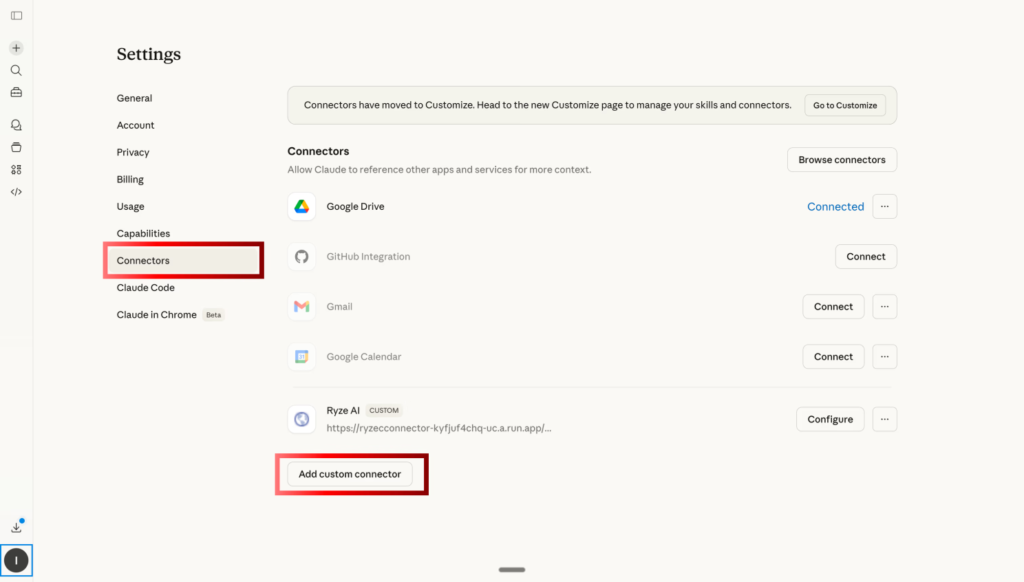
Step 2 — Open Settings → Connectors
Go to Settings and Connectors.
Add the custom connector.
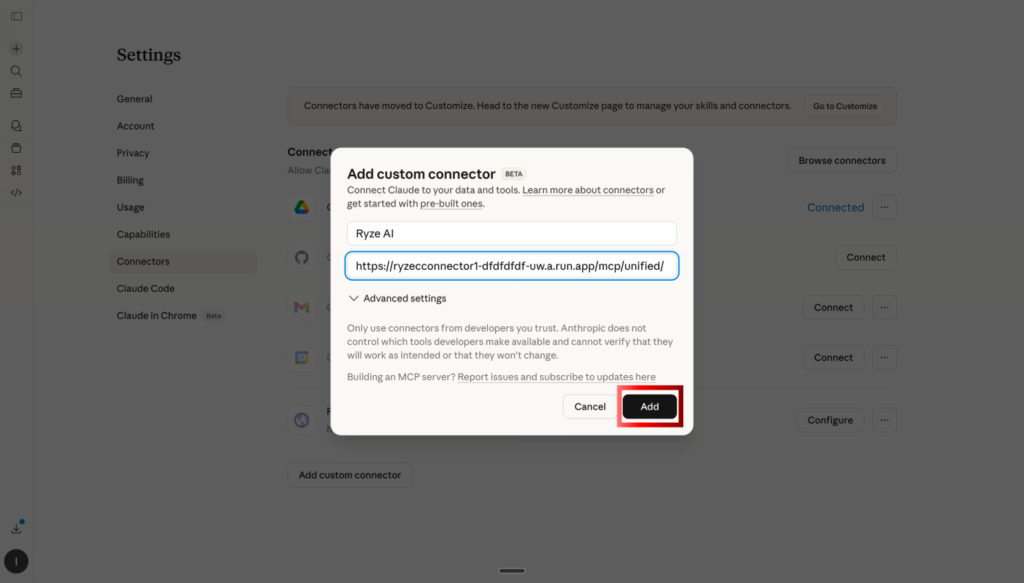
Step 3 — Paste your Google Ads MCP server URL
Paste the MCP URL.
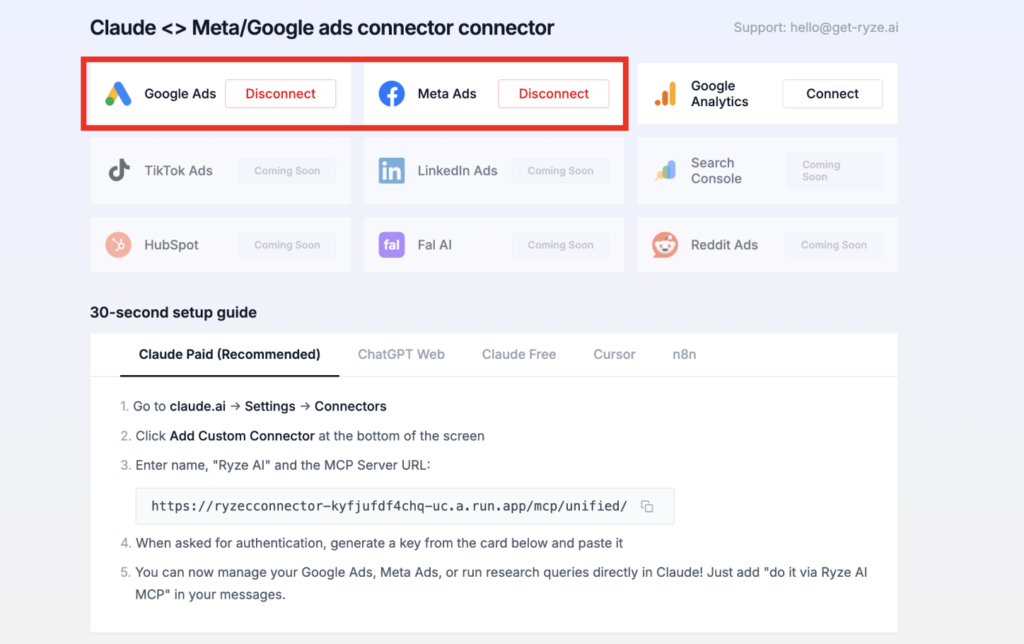
Step 4 — OAuth into your Google Ads account
Follow the OAuth prompt to grant Ryze AI access to your Google Ads account. If you're managing an MCC (Manager account), you'll be able to pick which child accounts to expose. Same permissions you'd grant any analytics or reporting tool.
That is the important point.
You are not manually wiring Google Ads into Claude yourself. You are adding a connector that handles the handshake and account access.
Step 6 — Start asking Google Ads questions
Open a new hat in claude.ai. You're live. Claude now has direct read-and-write access to your Google Ads account.
Can Meta Ads live in the same workflow, or do you still need separate reporting?
This is where the setup gets more interesting.
The blog post you shared is not only about Google Ads. It connects to a larger workflow where Google Ads, Meta Ads, and GA4 can sit in one place. A related article by the same author describes a single connector flow for Google Ads, Meta Ads, and GA4, and Ryze’s product page also positions the workflow as one conversation across platforms instead of separate reporting silos.
That matters because most customer questions are not platform-specific.
They sound more like this:
Why did lead volume go up, but pipeline quality drop?
Why does Meta Ads show strong results while Google Ads looks expensive?
Are both platforms claiming the same conversions?
A cross-platform workflow helps because the customer problem is rarely inside one dashboard. It usually lives in the gap between dashboards.
This is especially useful for agencies and multi-channel teams. You stop reviewing Meta Ads in isolation and Google Ads in isolation. You start reviewing the full acquisition system.
That shift is small on paper.
In practice, it changes how fast you spot overlap, misalignment, and wasted budget.
What should you ask Claude after the connection is live?
This is where many teams get stuck.
They connect the accounts, get excited, then ask generic questions and end up with generic answers.
The better approach is to ask problem-solving questions tied to decisions.
A few examples:
- Which campaigns spent the most in the last 30 days with no meaningful conversions?
- Compare this week to last week and flag anything unusual in spend, CPA, or conversion rate.
- Which Meta Ads campaigns are driving cheap leads but poor down-funnel quality?
- Which Google Ads campaigns are pacing too fast or too slow against the target budget?
- Where are Google Ads and Meta Ads likely claiming the same outcomes?
The article you shared includes prompt-based workflows for weekly snapshots, wasted spend checks, and cross-platform analysis. Ryze’s connector examples also show weekly reports, budget allocation, account audits, and overlap analysis as core use cases.
The key is specificity.
Do not ask, “How are my ads doing?”
Ask, “Which campaigns need attention this week, and why?”
That produces something closer to a working analysis and something farther away from AI fluff.
How does this actually help with wasted spend, reporting, and budget pacing?
Related Article: https://www.adlabz.co/15-signs-your-google-ads-are-draining-your-budget
Let’s use a simple example.
Say you run lead generation for a B2B company. Google Ads drives lower volume but stronger intent. Meta Ads drives more leads, but sales keep saying quality is mixed.
In a manual workflow, you would pull performance from both platforms, compare date ranges, build a pacing sheet, and then try to explain the story in plain English.
In a connected workflow, you can start with a better question:
“Compare Google Ads and Meta Ads for the last 30 days. Show spend, leads, cost per lead, and any signs of overlap or low-quality volume. Then flag where the budget should be reduced or defended.”
That question is useful because it reflects how real customers think.
They do not want a prettier dashboard.
They want to know where money is leaking.
The third-party workflows around Claude ad connectors lean heavily into this kind of output: weekly reports, budget checks, deduplicated analysis, and account audits that identify what deserves action first.
Reporting also gets better when Claude drafts the first layer of explanation.
Not the final client narrative.
Not the final strategic call.
Just the first pass that turns raw numbers into something readable.
That alone can save a lot of mental energy.
What can go wrong if you connect ad accounts without a process?
This part should not be skipped.
Anthropic clearly warns that custom connectors can link Claude to services that Anthropic has not verified, and those connectors may allow access and actions inside connected systems. Their Claude Code docs also warn users to be careful with third-party MCP servers and to use them only when trusted.
That means you need guardrails.
Use trusted connector providers.
Keep access limited to the accounts and roles that are actually necessary.
Decide whether Claude should only read data or whether it can also trigger changes.
Require approval for anything that writes back to the ad account.
Document who owns the connector and who can remove it.
This is not fearmongering.
It is just normal operating discipline.
A connected workflow can absolutely save time. But a sloppily connected workflow can create new problems, especially in agency settings where multiple client accounts are involved.
Is Claude replacing the media buyer, or just removing busywork?
The honest answer is simple.
It removes busywork first.
And that is already valuable.
Claude can help surface patterns, summarize data, compare periods, and organize findings faster. Anthropic’s own MCP documentation explains that connected tools let Claude work from real systems instead of pasted context alone.
But a good media buyer still decides:
Which tradeoffs matter?
Which metrics are signal versus noise?
Whether a campaign should be fixed, paused, or given more room.
Whether lower cost results are actually helping the business.
That is why this workflow is strongest in expert hands.
The better your questions, the better the output.
Who benefits most from this setup?
Not every advertiser needs this on day one.
But some teams feel the pain much faster than others.
Agencies are a natural fit because they repeat the same analysis across multiple accounts. In-house growth teams also benefit when they manage several channels and need quicker weekly reviews. Multi-brand businesses can gain even more because cross-account context is hard to hold in your head without some kind of system.
The common thread is not company size.
It is reporting friction.
If your team keeps exporting the same numbers, rebuilding the same summaries, and asking the same questions every Monday, this setup is worth serious attention.
Final thoughts: Is connecting Meta Ads, Google Ads, and Claude actually worth it?
Yes, for the right team, it is worth it.
Not because it turns Claude into your new head of paid media.
And not because every AI workflow deserves hype.
It is worth it because it solves a very real operational problem. Anthropic now supports the connector framework that makes this possible, and the setup guides you referenced show how marketers are already using that framework to connect Google Ads and Meta Ads into one working environment.
The real win is not novelty.
The real win is fewer exports, fewer repetitive reports, faster answers, and more time spent on actual optimization.
If your team already lives inside Google Ads and Meta Ads all week, Claude can become a useful layer on top of that work.
Just make sure you treat it like an operator assistant, not a replacement for judgment.
That is usually where the best results come from.