



If you lead a product or engineering team, you already know this: the tools your developers use can either speed everything up or quietly drain weeks from the roadmap.
In 2025, there are more shiny new platforms than ever. AI editors, cloud agents, test frameworks, CI tools. It is easy to throw random subscriptions at the team and still end up with slow releases and grumpy developers.
So instead of chasing hype, let us look at tools developers actually enjoy opening every day, backed by how the industry is moving. For context, Visual Studio Code is still the dominant editor in the Stack Overflow survey, with more than 75 percent of respondents reporting they use it regularly. Docker is the most used tool in the general tools category among professional developers, with 59 percent using it at work. AI tools are now part of the normal workflow too, with over 60 percent of developers already using them and more planning to adopt.
Jump to:
Below is a practical list of tools that match what your developers are already gravitating toward.
Quick comparison table
| Tool | Main job | Best for teams that want to fix this problem |
|---|---|---|
| Visual Studio Code | Core editor and lightweight IDE | One editor that works for almost every language and stack |
| Cursor | AI native IDE | Container-based local and cloud environments |
| GitHub Copilot | AI pair programmer | Reduce boilerplate and speed up everyday coding |
| Docker | End-to-end testing framework | Kill the “works on my machine” problem |
| Postman | API platform | Keep builds, tests, and deployments running without a separate CI system |
| Playwright | Keep APIs testable, documented, and shareable | Reliable browser tests in a modern stack |
| GitHub | Code hosting and collaboration | Clean pull request flow and transparent code history |
| GitHub Actions | CI and automation | Fast, developer-friendly way to track work |
| Linear | Issue tracking and roadmaps | One place for specs, decisions, runbooks, and product docs |
| Notion | Docs and project workspace | One place for specs, decisions, runbooks and product docs |
1. Which editor do most developers still love using in 2025?
Tool: Visual Studio Code
If you ask a room of engineers which editor they actually open all day, Visual Studio Code will still win by a huge margin. In the 2025 Stack Overflow survey, about three out of four respondents say they use VS Code, and it has held the number one spot for years.
For teams, that consistency matters. When almost everyone is comfortable in the same editor, onboarding becomes easier, pairing feels natural, and you do not need to debug odd issues caused by niche setups.
Why developers keep choosing it
- Fast enough on most machines.
- Great debugger and Git support built in.
- Marketplace with thousands of extensions, including AI assistants like GitHub Copilot.
Example
A small SaaS team with Python backend, React frontend, and Terraform infra can standardize on VS Code for all three. One editor, separate workspaces, plus shared settings checked into the repo. New hires clone the repo, import the settings file, and are productive in a single morning.
2. What if your editor were built around AI from day one?
Tool: Cursor
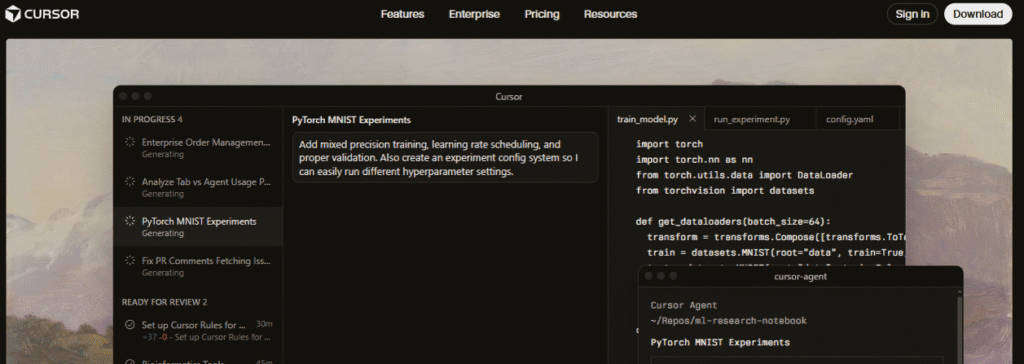
Cursor is a newer player that many developers are quietly switching to for day-to-day coding. It is an AI-focused editor forked from VS Code, but tuned heavily for AI-powered workflows like chat-based refactors, multi-file edits, and repo-level reasoning.
Where traditional editors bolt AI on through extensions, Cursor treats AI as a first-class part of the environment.
Where Cursor shines
- Make large changes across a codebase with natural language prompts.
- Ask questions about unfamiliar repos and get context-aware answers. Cursor+1
- Use leading large language models behind the scenes instead of being locked to one provider.
Example
Your team acquires a legacy microservice with almost no docs. A developer can ask Cursor things like:
“Explain how user authentication flows through this service and show me where JWTs are validated.”
Instead of digging through files for hours, they get a guided tour plus code pointers. Human review is still essential, but the ramp-up time drops dramatically.
3. How are developers using AI pair programmers without losing control?
Tool: GitHub Copilot
GitHub Copilot has become the default AI coding assistant for many teams. It plugs directly into editors like VS Code, JetBrains IDEs, and Neovim, and is tightly integrated with GitHub itself. It has grown to millions of users and thousands of business customers, making it one of the most widely adopted AI developer tools. Gitub+1
The main value is not magical full features, but speeding up the boring parts: boilerplate, glue code, repetitive patterns.
Typical ways developers use Copilot
- Auto-completing common patterns in their stack.
- Drafting test cases as they write new features.
- Converting one language or framework snippet to another.
What leaders need to know
Developers still have mixed feelings about the accuracy of AI tools. In Stack Overflow surveys, many report using AI tools but remain cautious and double-check results. The right way to frame Copilot is as an accelerator, not a replacement. Encourage PR review standards and testing discipline, and Copilot becomes a productivity boost instead of a risk.
4. How do teams finally kill the “works on my machine” problem?
Tool: Docker
Most teams still burn hours chasing environment bugs: missing libraries, different Node versions, odd OS differences. Docker remains the cleanest way to standardize the runtime from laptop to production.
Docker is not just a buzzword. In the Stack Overflow survey data, Docker shows up as the most used and most admired general developer tool among professionals, with 59 percent using it.
Why developers like Docker
- Every service can have a predictable container image.
- New contributors run a single command and get the same stack.
- Combined with Docker Compose, multi-service dev environments become repeatable.
Example
Suppose your product has a frontend, backend, database, and Redis. Instead of a wiki page of setup instructions, the team maintains a docker-compose.yml. A new engineer runs docker compose up, waits a few minutes, and has an entire stack running locally, with ports mapped and seed data loaded.
5. How do you stop APIs from becoming a black box?
Tool: Postman

Modern products are basically collections of APIs: internal, partner, and third-party. If your developers do not have a good way to explore, test, and document them, debugging turns into guesswork.
Postman positions itself as the leading API platform and reports over 40 million developers using it worldwide. Postman+1 It has evolved from “just an API client” into a full API lifecycle tool.
Where Postman fits into a dev toolbox
- Quickly send and debug HTTP requests.
- Store collections of requests per service or per feature.
- Document and share APIs with product, QA, and external partners. Postman
Example
When you expose an internal billing API for the finance team, you can share a Postman collection with example requests, authentication details, and sample responses. Instead of asking engineers for help each time, non-developers can test scenarios themselves.
6. How can developers catch ugly bugs before customers do?
Tool: Playwright
End-to-end testing used to feel slow, flaky, and painful. Tools like Playwright have changed that perception for a lot of teams. Playwright is an open source framework from Microsoft that focuses on reliable cross-browser testing with one API for Chromium, Firefox, and WebKit. Playwright+1
Multiple independent reviews now rank Playwright as one of the best overall web testing frameworks thanks to its modern feature set and cross-platform support.
Why developers adopt Playwright
- Tests run headless in CI and visually in local debug mode. Playwright+1
- Built-in waiting and retry logic reduces flakiness.
- Supports TypeScript, JavaScript, Python, .NET, and Java, so most teams can use it. Playwright+1
Example
A product team automates their main customer signup flow with Playwright: landing page, form fill, email confirmation, and first login. That single test protects revenue every time they change UI, routing, or authentication code.
7. How do you keep pull requests and branches under control as the team grows?
Tool: GitHub

GitHub is so common that it sometimes disappears from tool discussions. But for developers, it is the central nervous system of day-to-day work: branches, pull requests, issues, code review, and history live there.
GitHub also layers on features like protected branches, code owners, security scanning, and discussions, which help keep quality in check without slowing teams down. GitHub+1
How GitHub reduces friction
- Pull request templates guide better descriptions and checklists.
- Branch protection rules prevent accidental direct pushes to main.
- Inline comments and suggestions make code reviews faster and clearer. The GitHub Blog+1
For leaders, investing an afternoon into good GitHub conventions often yields more quality than adding another tool.
8. How can CI and automation stop being a fragile YAML monster?
Tool: GitHub Actions
Continuous integration and delivery are not optional anymore. The question is which CI tool will give your team fast feedback without adding more dashboards to babysit.
GitHub Actions is the obvious choice when your repos already live on GitHub. It lets you trigger workflows on pushes, pull requests, and other events, and handle build, test, and deployment directly from the repo. GitHub+1 Many articles and surveys now call it one of the most popular CI tools because of its tight GitHub integration and large marketplace of reusable actions.
Benefits developers notice
- No separate CI service to sign into for most pipelines.
- Shared workflow files mean every repo follows similar patterns.
- Marketplace actions cover common tasks like running Playwright tests, building Docker images, or deploying to cloud providers. GitHub+1
Example
A small startup uses GitHub Actions to run unit tests on every pull request, Playwright tests on main, and deploy automatically to staging when a release branch is merged. There is no dedicated DevOps engineer. The workflows live as code inside repos and are owned by the team.
9. How do you track work in a way developers do not hate?
Tool: Linear

Issue trackers have a reputation problem. Many developers associate them with slow boards, noisy notifications, and sprawling configurations.
Linear has gained a loyal following by focusing on speed, keyboard-driven workflows, and a clean interface built specifically for product and engineering teams. The product markets itself as a purpose-built system for modern software development that streamlines issues, projects, and roadmaps.
Why teams switch to Linear
- Fast search and navigation that feels closer to an editor than a ticket system.
- Tight integration with GitHub, Slack, and other dev tools.
- Simple but clear views for projects, sprints, and roadmaps. Linear+1
For many teams, just making the issue tracker pleasant to use leads to better ticket hygiene and more honest estimates.
10. Where do you keep specs, decisions, and runbooks so they do not rot?
Tool: Notion
Docs are often scattered across PDFs, random Google Docs, and forgotten Confluence spaces. Developers waste time hunting for answers and end up asking the same questions in chat.
Notion has become a popular answer to that mess. It offers a flexible workspace that combines docs, databases, and project views in one place, and many guides now recommend it specifically for software teams managing projects and documentation.
How development teams use Notion
- Create product requirement pages linked to sprints and repos. notion.com+1
- Maintain ADRs (architecture decision records) in a simple database.
- Store runbooks, on-call guides, and onboarding paths for each service.
Instead of yet another static wiki, Notion can act as a living system that mirrors how your team actually works.
So which tools should you prioritize first?
You do not need to roll out all ten tools at once. A more realistic plan is to think in layers.
- Foundation tools
- Visual Studio Code or Cursor as the standard editor.
- GitHub is the single source of truth for code.
- Docker for local and production parity.
- Quality and delivery tools
- Playwright for end-to-end testing of critical flows.
- GitHub Actions to automate builds and tests.
- Collaboration and knowledge tools
- Postman for shared API work.
- Linear for issues and roadmaps.
- Notion for specs and documentation.
- AI acceleration layer
- GitHub Copilot or Cursor’s AI features to speed up everyday coding, with strong review and testing practices around them.
The right mix depends on your stack and team size, but the pattern is the same: give developers tools that feel fast, do not fight their workflows, and remove friction from everyday tasks.
If you choose tools your developers actually like using, you do not just tick a “productivity” box. You make it easier for them to do their best work, ship better features, and stick around long enough to see the impact.